
MidiManager
Bind features on your devices
With MidiManager, you can bind multiple actions to your midi device's buttons, sliders, and knobs. You can also bind actions to custom keyboard shortcuts and you can even use your phone as an input device.What is MidiManager?
Features
The possibilities with this software are endless. You can turn your device into a soundboard. You could use the keyboard simulator to create shortcuts that can be used in editing programs, games, or any other program. In addition, you can use sliders to regulate the volume of; programs, audio devices and more. These are only a few examples of what you could do with MidiManager.Community
Join our Discord server to stay up to date, suggest features and get support.Updates
New features and improvements are constantly being added to MidiManager.Discover The Process
Learn how to get startedSelect a device
Select a midi device, keyboard or mobile deviceBind features
Choose any selection of MidiManager's 45 featuresSee it in action
After binding the feature, you can directly test it out
FeaturesThe basic features of MidiManager allow you to take control Play audio
 Simulate a keyboard
 LED colors
 open links
 media functions
 Mute programs
 Mute audio devices
 Control volume of individual programs
 Control volume of audio devices
 Control volume of audio devices
Play audioSimulate a keyboardLED colorsopen linksmedia functionsMute programsMute audio devicesControl volume of individual programsControl volume of audio devicesControl volume of audio devices




Input devices
Midi Devices
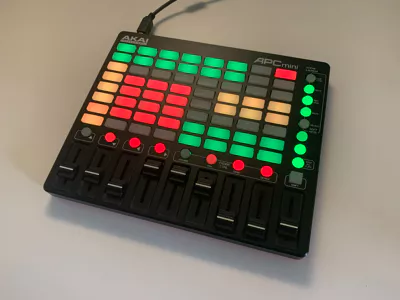
MidiManager supports a few midi devices by default: “KORG nanoKontrol 2”, “AKAI APCmini”, “Samson Graphite MD13”, “MidiPlus SmartPAD” and the “EZ Creator Plus”.You can add any midi device to MidiManager that you want using our “Midi Device Creator”.
Keyboards
With MidiManager you can record keyboard combinations, and bind features on them. You can make the combinations as complex as you like.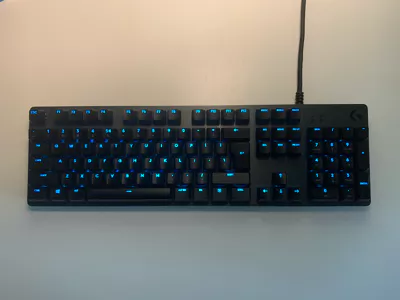
Mobile Devices
MidiManager allows you to use any device that can run a browser as a input device for MidiManager. You will be able to access a personal webpage on your mobile device on which you can press buttons and move sliders.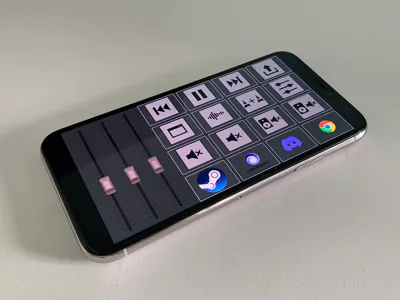
Discord
If you have questions or need some help, feel free to ask in our discord server.This is also the place were you can suggest features, report bugs and stay up to date on the latest developments.
Join our Discord Server
Pricing plans
Basic
FREE
Input Methods✔ Midi devices and custom midi devices✔ Demo for mobile devices✔ 4 keybinds for keyboard devices
Features to bind✔ Full access to all basic features that can be bound to devices✔ Integrations for OBS, Discord and games
Privileges✔ Fast support via Discord✔ Suggested features will be considered
Other✔ 2 Offline hours
Supporter
€5,99
lifetime access✔ All features from BASIC plan
Input Methods✔ Unlimited keybinds for Keyboard devices
Features to bind✔ Integration for Zigbee (controlling lights)
Privileges✔ Access to restricted alpha versions✔ A special discord role
Other✔ 12 Offline hours
Upgrade to PLUS
€4,49
lifetime accessUpgrade from your supporter plan to MidiManager Plus.